
Our flagship is now on Google Play
Intelligent apps, built for what’s next.
Agentic Applications engineers ambitious software for a connected world, where every signal finds its route. Our flagship, NxtGenTV Elite, is on Google Play now, and the next wave is already in development.
sourceXtream, M3U URL, M3U file, or Stalker portal
epgXMLTV for M3U/Stalker
guideEliteCast timeline guide: channels down the side, programs across a shared time axis, now-line
recordDVR-style recording to internal storage or an authorized USB drive or SD card
viewEliteView split-screen live TV, panel count matched to your device
remoteD-pad navigation, visible focus, TV launcher entry with banner artwork
devicesPhone and Android TV
contentNone included. You bring a source you are authorized to use.
01Products
Built for the big screen. And the small one.
Introducing NxtGenTV Elite: The ambitious flagship release from Agentic Applications. As our very first product, it is engineered from the ground up to redefine the media landscape—bringing intelligent, autonomous tech to the core of your viewing experience.
Available


Live TV player
Bring your own playlist. Watch it beautifully.
Live TV from your own TV provider is free: add your provider and watch, with no plan and no card. New subscribers: choose Yearly for a free 7-day trial, all features unlocked.
NxtGenTV Elite turns your Android TV or TV box into a live TV powerhouse. Browse channels on see-through glass menus while the picture keeps playing full screen, record live TV with one press, let EliteScheduler record a whole series for you, and download films and episodes to watch offline.
The same NxtGenTV Elite, in your hand. Watch live TV, films and series with the same glass menus as the big screen, record and schedule right on your phone, and download films and episodes to watch offline wherever you are.
One app for TV, box and phone. Designed for touch. Refined for the remote. NxtGenTV Elite delivers a premium experience across every screen—from your Android phone to your TV. A plan bought on Google Play works on every device signed in to your Google account. Website purchases, coming soon, cover up to 5 devices.
TiviMate’s own Google Play listing says it is “not optimized for touch devices such as phones or tablets.” NxtGenTV Elite is the more affordable option for TV and phone: live TV is free on both, and one plan unlocks everything on every device on your Google account.
Content-neutral by design. NxtGenTV Elite does not include, host or provide any channels, streams or content. You bring a source you are authorized to use.
Runs on Android TV, TV boxes and phones
Runs on Android phones, tablets, TVs and TV boxes
TV & Box
-
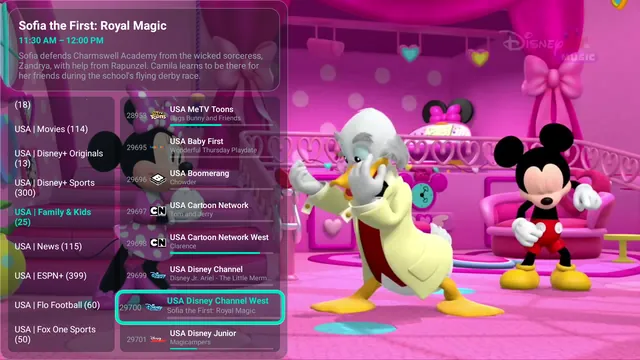
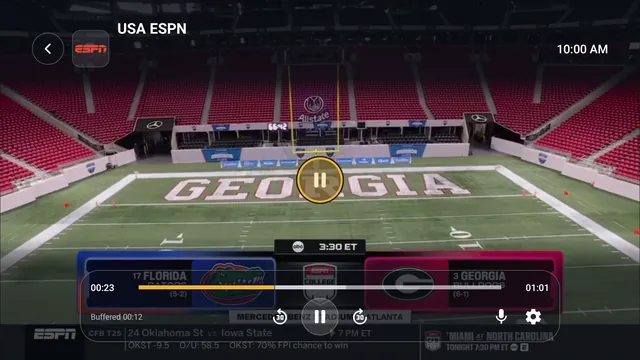
Glass channel panel and controls over live TV · TV Glass menus over the full picture
Press left and a see-through channel list slides in while your channel keeps playing full screen: categories, channels with what is on now, and what is coming up next. Press right for that channel's schedule, on glass too. Hold OK for a glass quick menu with the guide, recording, captions, audio, multiview and a sleep timer.
-
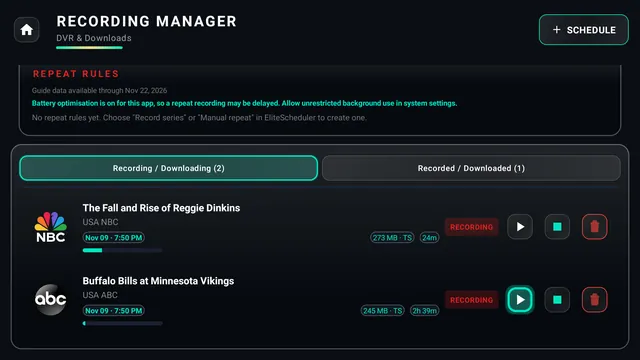
Recording Manager · TV Record live TV with one press With a plan
Hit record and NxtGenTV Elite captures the channel, reconnects by itself if your provider drops the stream, and keeps writing one continuous recording. Watch from the start while it is still recording, run several recordings and downloads at once, save to a USB drive or SD card, and protect the ones you want to keep.
-
EliteScheduler records it for you With a plan
Pick a show from the schedule and EliteScheduler takes it from there: record it once, record the whole series by name, or record the same time slot every week. Keep only the newest episodes if you like, add extra time at the end, and the recording starts on time even with the screen off.
-
Download for offline With a plan
Save films and episodes to your device and watch them any time, even with no connection to your provider.
-
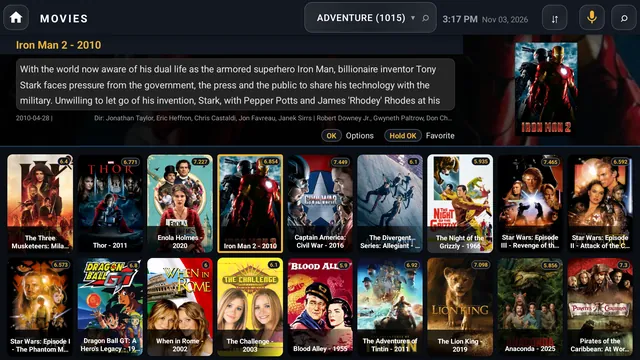
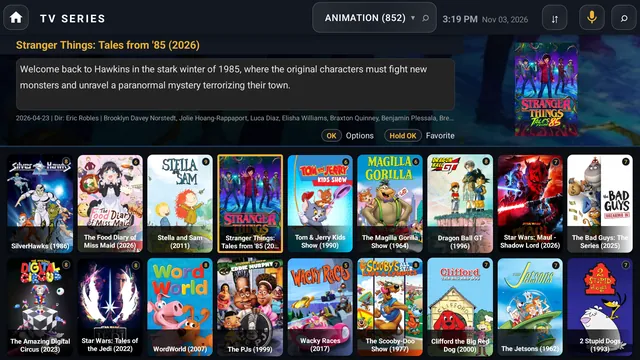
Film and series libraries · TV Films and series, poster-rich With a plan
Big artwork, the details you need above a row of posters, and the next episode lined up to play on its own when you are binge-watching.
-
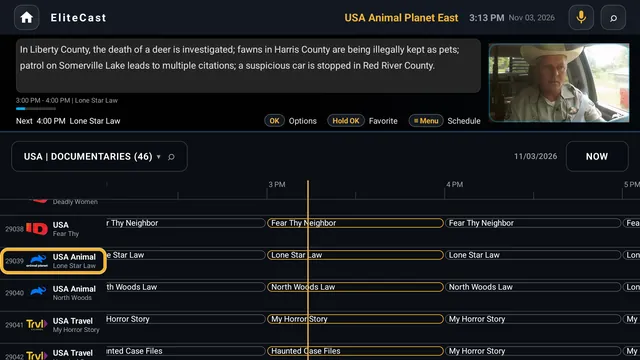
EliteCast guide · TV EliteCast, the timeline guide With a plan
Channels down the side, programs across a shared time axis and a now-line, with a live preview of the channel you are on. Pick any show to record it now or schedule it for later.
-
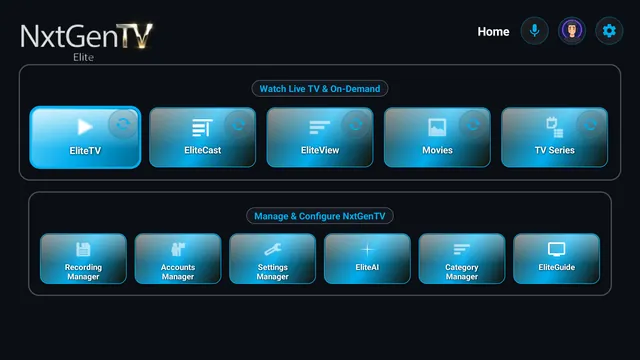
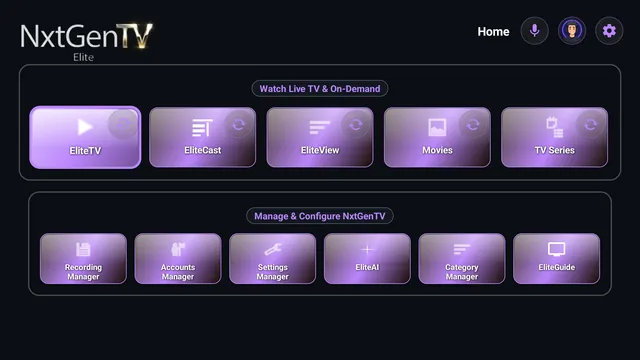
Blue and purple accents · TV Make it yours With a plan
Your accent color and text size are your choice. These screens use blue and purple; pick any of fifteen colors, say blue on the TV and teal on your phone, set the text from small to extra large, and decide how much of the picture shows through the glass panels. Every change lands the moment you save.
Also on board
EliteView With a plan
Up to five live channels on one screenPick a two, three, four or five-way layout and give every panel its own channel. The sound follows the panel you move to while the others keep playing silently. The big game, the breaking story and the kids' cartoon, all at once.
- Layouts for 2, 3, 4 or 5 channels
- Sound follows the panel you are on
- Change a panel's channel in two presses
- Auto matches the panels to what your box can handle
Category Manager
Your line-up, cleaned upProviders send hundreds of categories. Category Manager lays them all out in one screen, a column each for EliteTV, EliteCast, EliteView, Movies and TV Series. Hide what you never watch and it is gone from every list and every search.
- Hide a whole region with one switch
- Choose the category each screen opens on
- Hidden means hidden, search included
- Kept separately for each provider account
Settings Manager
Every setting in one place, explainedSettings Manager puts the whole app in your hands, and every row tells you in plain words what it does. Tune playback, recordings, the guide, EliteView and the look of the app, then save once.
- Live and film buffers, automatic or your own
- Guide hours, row height and live preview
- Accent color, text size and glass transparency
- High-Efficiency Mode for lower-powered boxes
- Bring your own sourceXtream, M3U URL, M3U file, or Stalker portal, plus XMLTV for M3U/Stalker
- Built for the remoteD-pad navigation, visible focus, TV launcher entry with banner artwork
- Room for the whole householdOne provider is free; a plan saves up to 10 on a TV and switches between them
- App Guide and EliteBotReference articles plus a helper that usually jumps to the right screen
- Light or dark With a planA light or dark look, remembered separately for your TV and your phone
Phone
-
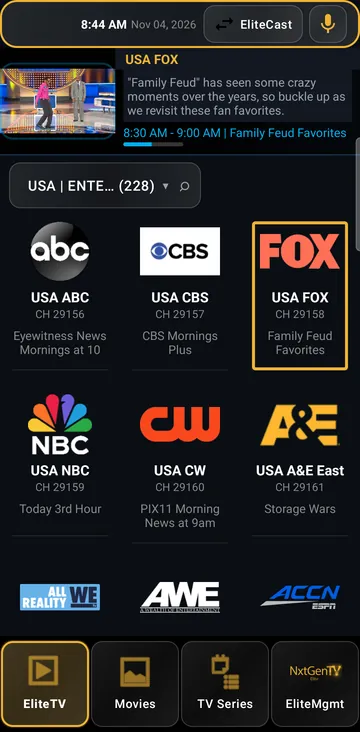
EliteTV on your phone · Phone Live TV, glass and all
Your channels in a grid with what is on now, and every category a tap away with its channel count. Long-press the picture for the glass quick menu, or swipe in from the left to browse channels while you keep watching.
-
Downloads for the road With a plan
Download films and episodes to your phone and watch them offline on a plane, a train, or anywhere you cannot reach your provider.
-
Record and schedule on your phone With a plan
Start a recording with one tap and let EliteScheduler record a whole series or the same slot every week. The Recording Manager shows your free space and lets you start recordings a few minutes early, keep them running late, and wake the device before one begins.
-
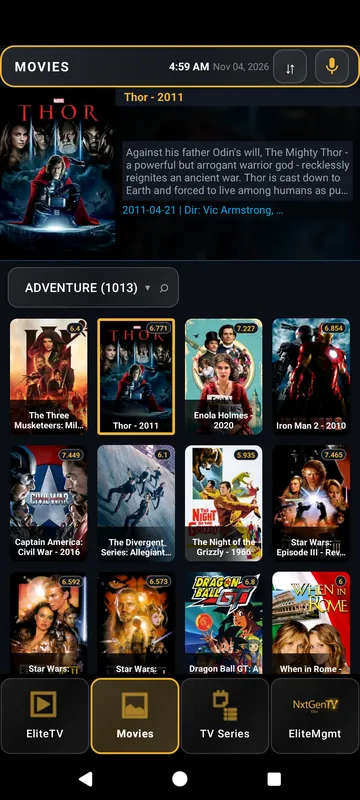
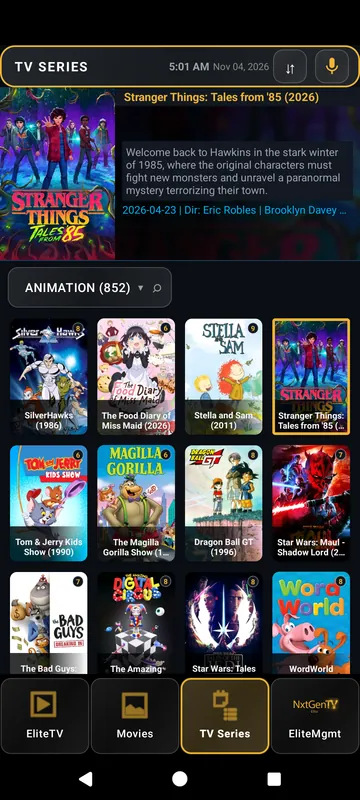
Films and series · Phone Films and series in your pocket With a plan
Poster grids with the details up top, and the next episode ready to roll when one ends.
-
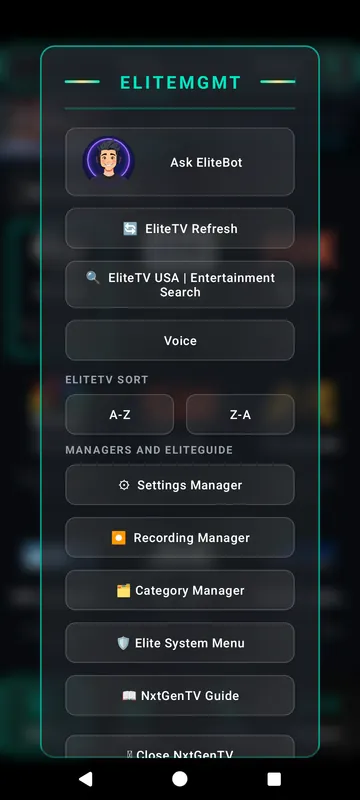
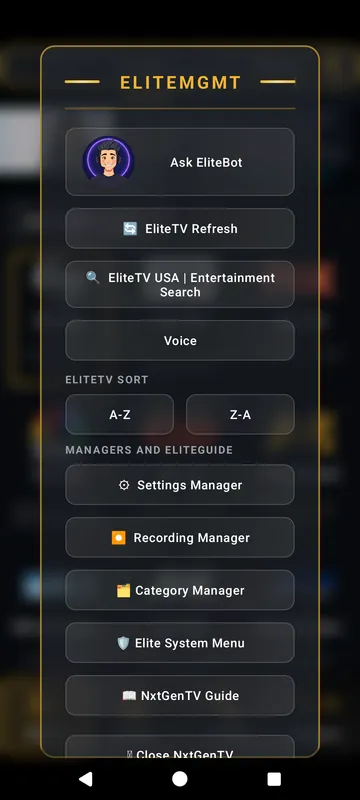
The EliteMgmt menu in Teal and in Gold · Phone Make it yours With a plan
Your accent color and text size are your choice: here is the same glass menu in teal and in gold. Pick any of fifteen colors, say blue on the TV and teal on your phone, set the text from small to extra large, and choose see-through panels and a light or dark look. It all applies the moment you save.
-
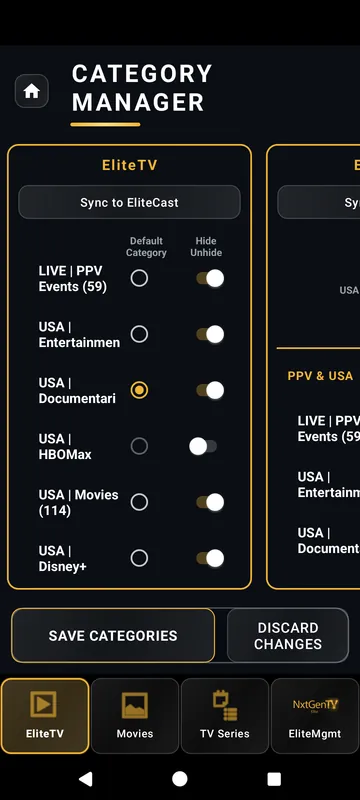
Category manager · Phone Only the channels you want
Give each screen its own default category and hide the ones you never watch, so every list opens exactly where you want it.
Also on board
- EliteCast timeline guide With a planChannels down the side, programs across a shared time axis, now-line
- Settings ManagerEvery setting in one place, each one explained in plain words
- Bring your own sourceXtream, M3U URL, M3U file, or Stalker portal, plus XMLTV for M3U/Stalker
- App Guide and EliteBotReference articles plus a helper that usually jumps to the right screen
The screenshots show NxtGenTV Elite running with a live TV provider account the developer uses. Channel names, logos and posters on screen belong to their owners and appear only to show the app working. NxtGenTV Elite does not include, supply or sell any channels, films or series. You add your own provider.
Works with: EliteAtlas, the TV guide add-on
Available
NxtGenTV Elite for Resellers
Your own branded TV app
Your name on the app. We build and deliver it.
Offer your customers a TV app with your own name and branding, on Android TV, Google TV, Fire TV and Android phones. We build it, sign it and deliver it to you, and we deliver every update too.
Content-neutral by design. NxtGenTV Elite does not include, host or provide any channels, streams or content. You bring a source you are authorized to use.
-
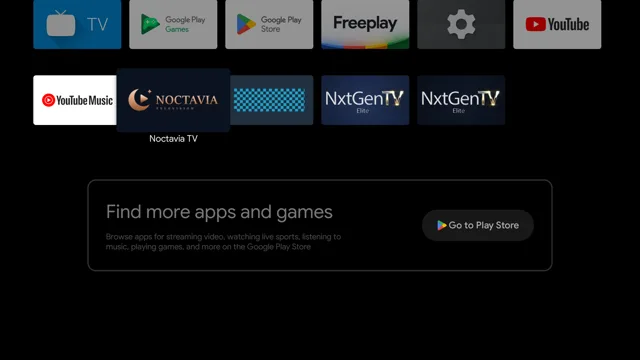
Your app on the home screen (sample brand: Noctavia TV) · TV Installed under your name
Your customers install an app with your name and icon on their TV and phone. We build it, sign it and deliver it, and every update after it.
-
Glass channel panel and controls over live TV · TV The full NxtGenTV Elite player
Your customers get the same app: glass menus over the full picture, the channel guide, recordings, movies and series, all under your brand.
02About
Big vision. Exacting craft.
Agentic Applications is a software company built on one conviction: great software should feel a generation ahead. We began in the living room with NxtGenTV Elite, and our pipeline now reaches into AI-assisted development and simulation games, every project held to the same exacting standard.
-
Built for every screen
A remote across the room and a phone in your hand ask different things of an app. NxtGenTV Elite runs on both, with D-pad navigation and visible focus wherever a remote is in play.
-
Intelligence on your terms
Smart where it counts, optional where it should be. EliteBot helps you reach the right screen in NxtGenTV Elite, and in Pocket Naighbors AI stays off until you switch it on with your own provider key.
-
Clear about what we make
Our software says plainly what it does. NxtGenTV Elite plays the sources you bring and includes no channels or content of its own.
03Contact
Let’s connect.
Questions about NxtGenTV Elite, curious about what is coming next, or have an idea worth routing our way? Send us an email.